Magento
Step 1
Insert the Shoplytics script in the head section of the website. You have received this from us by email.
Step 2 differs depending on your Magento version:
Magento (Commerce Version)
Follow Magento's instructions for activating the Tag Manager at the following link: To the official guide
You don't need to do anything other than follow the steps shown under Step 3. Enter "GTM-KK8SCVP" as the "GTM ID". (This is the official Shoplytics container. Nobody other than the Shoplytics developers gets access to it, in order to protect all Shoplytics customers.)
Magento (Open Source Version)
- Install GTM plugin: To the plugin
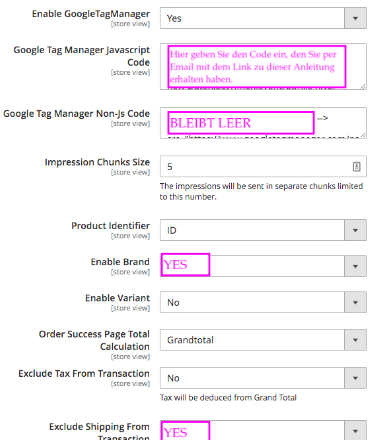
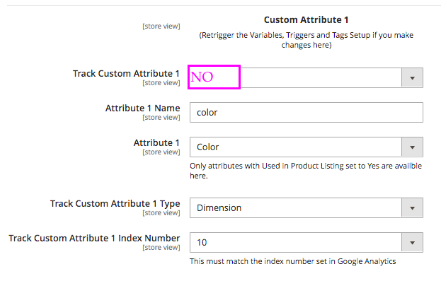
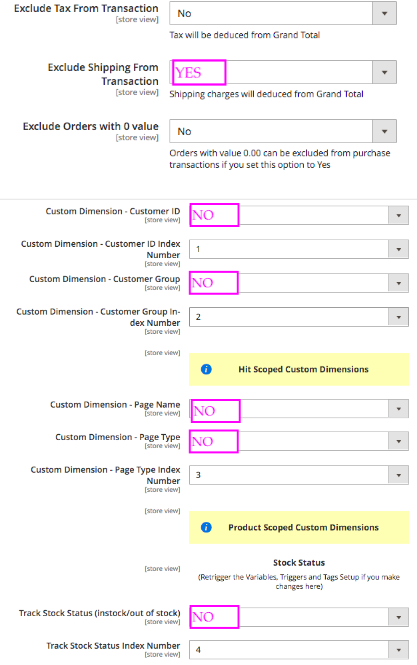
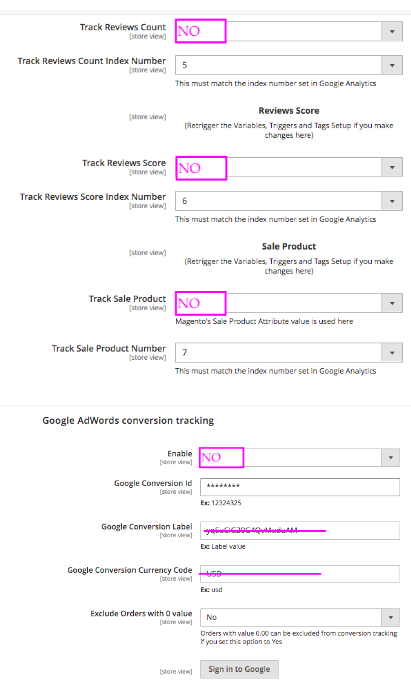
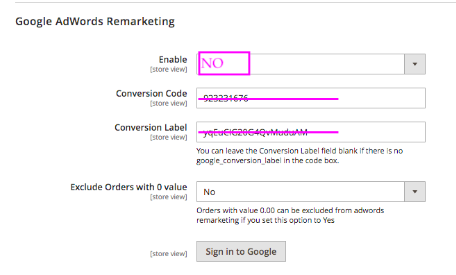
- Configure the settings as shown in the following images (You can find the "Google Tag Manager Javascript Code" here)
If you do not want to purchase the GTM plugin, the datalayer can also be provided directly by Shoplytics. However, this requires custom programming for your shop (which is then loaded directly through the Shoplytics script.). The Shoplytics datalayer service is somewhat cheaper than the GTM plugin and can be booked at https://www.checkout-ds24.com/product/592227/.